
Patch server packages
Server Patching lets you check for operating-system package updates and install them from the Coolify dashboard. Server Patching is marked Beta.
By default, Coolify does not install updates automatically. You choose when to update one package or all available packages. On Debian, Ubuntu, and RHEL-family servers, you can also turn on automatic security updates.
Coolify records package updates, reboots, and changes to the patch settings in the audit log.
Docker, kernel, and system updates can restart services or require a server reboot. Back up important data and choose a maintenance window before selecting Update all packages.
Newer package versions, especially Docker releases, can introduce changes that break Coolify or your applications. Review the release notes carefully before updating.
Update server packages
Open Server Patching
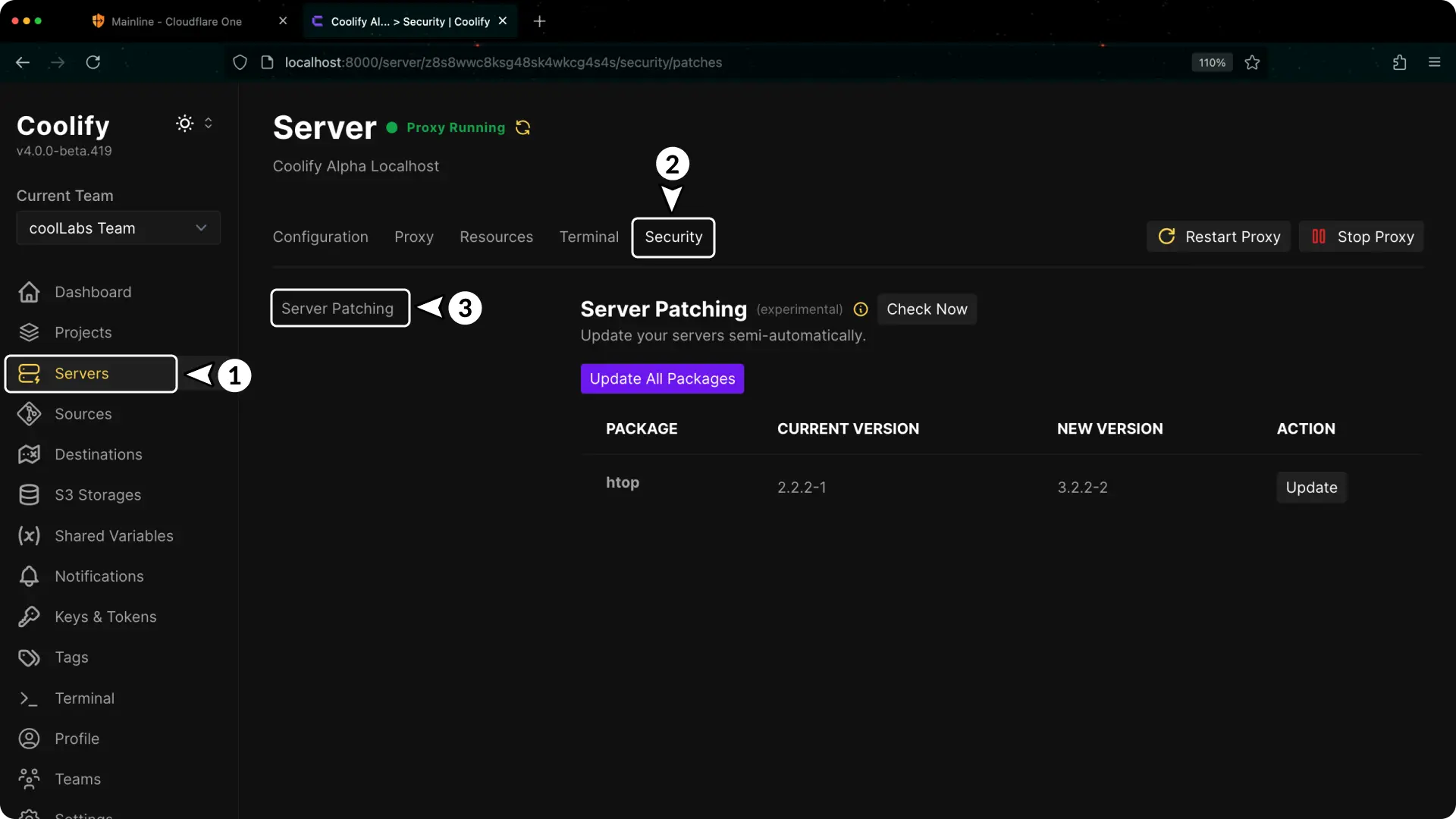
- Open Servers in the Coolify sidebar.
- Select the server you want to update.
- Select Security in the server menu.
- Select Patching.
Check for updates
Select Check for updates.
Coolify runs the check in the background. The check can take several minutes. You can leave the page. Coolify saves the result and shows it with Last checked when you open the page again.
When updates are available, the Package updates section lists the package name, the new version, and the current version. If no updates are available, the page shows Up to date.
Coolify marks these packages:
- Security: the update is a security update. APT, DNF, and Zypper report security updates. APK and Pacman do not, so Coolify shows no security count for them.
- A warning icon: the update can restart Docker and the running containers, restart core system services, or need a reboot. Hover over the icon to see the risk.
If the server must reboot to apply updates, the page shows Reboot required.
Review the packages
Before installing anything:
- Read the package names in the update list.
- Check release notes for important services you run.
- Pay extra attention to Docker and kernel packages.
- Create a current backup for important applications and databases.
If you are unsure about a package, update it during a maintenance window or leave it for your server administrator.
Install updates
Choose one of these options:
- Select Update beside one package to install only that update.
- Select Update all packages to install everything in the list.
Complete the confirmation when Coolify asks. An activity window shows the output from the server while the update runs. When the update finishes, Coolify checks the server for updates again.
Arch Linux does not support partial upgrades. On servers that use Pacman, you can only select Update all packages.
Check the server again
After the update finishes:
- Confirm the installed packages no longer appear in the list.
- Return to Servers and confirm the server is reachable.
- Open important applications and databases hosted on the server.
- If the page shows Reboot required, select Reboot server and enter the server name to confirm. All containers on the server stop. Containers with a restart policy start again after the reboot. Coolify checks the server for updates again five minutes later.
Automatic security updates
On servers that use APT (Debian, Ubuntu) or DNF (RHEL family), the server can install security updates every day without you.
- APT: Coolify installs
unattended-upgradesand allows only the security origins. - DNF: Coolify installs
dnf-automaticand setsupgrade_type = security.
Other package managers do not support automatic security updates. The Automatic security updates field does not appear for them.
To turn on automatic security updates:
- Open the Patching page of the server.
- In Maintenance window, enter the daily start time in the 24-hour format
HH:MM, for example03:00. The time uses the time zone of the server. - In Automatic security updates, select Turn on.
- Read the confirmation and select Turn on.
- If Docker comes from the operating system packages (for example
docker.ioormoby-engine), a security update restarts Docker. All containers on the server stop and start again. Docker CE from the Docker repository, as Coolify installs it, is not updated. - Services that use an updated library, for example OpenSSL or glibc, can restart.
- The server installs a new kernel but does not reboot. Coolify then shows Reboot required.
To turn off automatic security updates, select Turn off and confirm. Coolify removes its configuration from the server, and the server uses the default of the operating system again. Check that default if you want no automatic updates at all.
Check frequency
By default, Coolify checks connected servers for package updates once a week, on Sunday. To change this, enter a cron expression or a preset such as daily, weekly, or monthly in Check frequency, and save. A check can run at most once per hour.
Patch status in the server list
The Servers page shows the patch status of each server from the last check, for example 2 security updates, 3 updates, Reboot required, or Patch check failed. A summary line above the list shows how many servers have updates, have security updates, or need a reboot.
The patch status shows only for users who can open the security pages of the server.
Update notifications
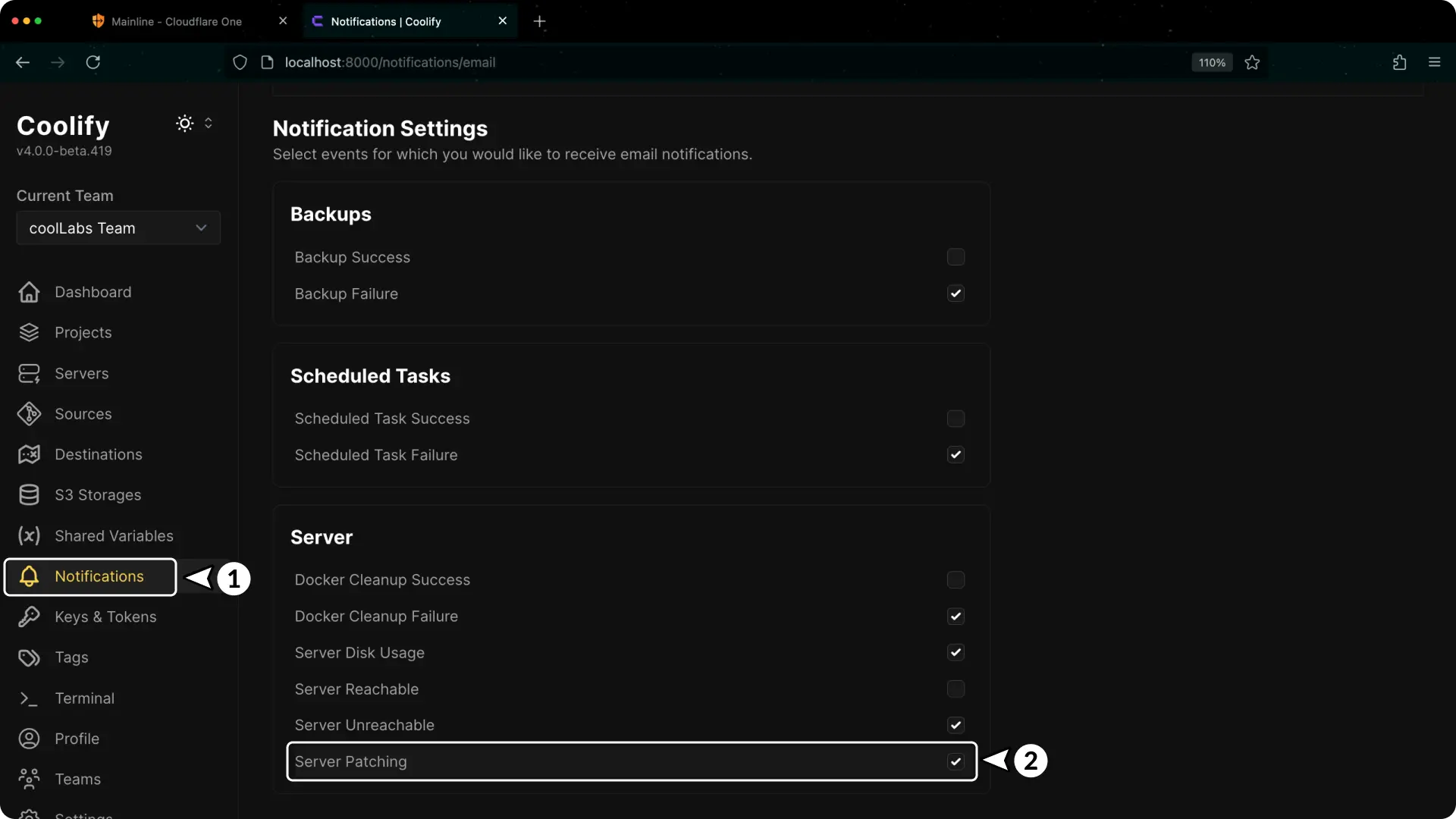
Coolify sends a Server patching notification when a scheduled check finds updates, or when a check starts to fail. A check that you start with Check for updates sends no notification for available updates.
To review the notification setting:
- Open Notifications in Coolify.
- Select the notification channel you use.
- Find Server patching.
- Enable or disable the notification and save the channel settings.
The scheduled check only reports available updates. It does not install them.
Supported package managers
Server Patching currently supports APK, APT, DNF, Pacman, and Zypper. Coolify reads /etc/os-release on the server to pick the package manager.
| Package manager | Operating systems |
|---|---|
| APK | Alpine Linux |
| APT | Ubuntu, Debian, Raspberry Pi OS, Pop!_OS, Linux Mint, Zorin OS |
| DNF | Fedora, CentOS, RHEL, Rocky Linux, AlmaLinux, Oracle Linux, Amazon Linux |
| Pacman | Arch Linux, Manjaro, EndeavourOS |
| Zypper | SLES, openSUSE Leap, openSUSE Tumbleweed |