
Set up MCP
Set up Coolify MCP by enabling the instance endpoint, confirming team access, creating a token, and adding the endpoint to your AI client.
Before you begin
- Use Coolify Cloud or a self-hosted Coolify instance with a public HTTPS URL.
- On self-hosted Coolify, enable API access in Settings > Configuration > Advanced.
- Choose the team whose resources the client must access.
- Create an API token with the smallest required permissions. See API tokens.
An MCP client can use every operation allowed by its token. Store the token in the client's secret configuration, never commit it, and revoke it if exposed.
Example values
This guide uses Coolify Cloud in its examples. If you use a self-hosted Coolify instance, replace app.coolify.io with your instance's domain in every URL, and use your own token:
- Coolify URL:
https://app.coolify.io - MCP endpoint:
https://app.coolify.io/mcp - API token:
67|abcthisisa123dummytoken
Enable MCP
Coolify Cloud already has instance MCP enabled. Skip the Dashboard and API tabs, then continue to Create an MCP token. Team access remains enabled by default, but check team settings if a client receives 403.
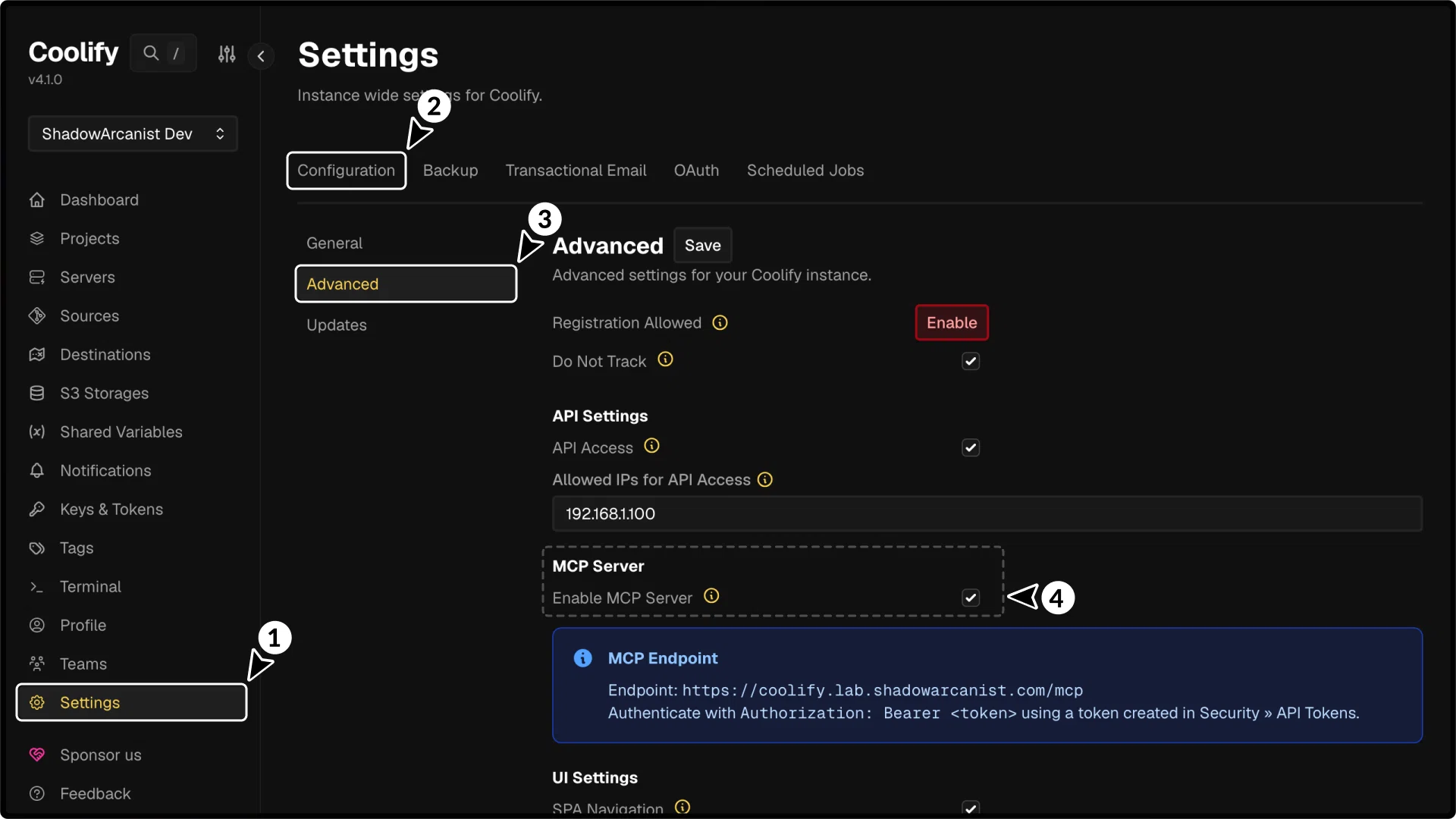
- Open Settings in the sidebar.
- Select Configuration.
- Open Advanced.
- In API and MCP, set MCP server to Enabled.
MCP must also be enabled in the current team's settings. Open team settings and set MCP server to Enabled for this team.
Create an MCP token
Create a token from Keys & Tokens > API Tokens while the required team is active.
Coolify displays the complete token only once. Copy it into the client's secret configuration before leaving the API Tokens page.
- Use
readfor inventory and inspection. - Add
read:sensitiveonly for supported sensitive data or log summaries. - Add
deployfor deploy, start, stop, restart, or cancel operations. - Do not use
rootfor normal MCP clients.
MCP endpoint URL:
https://app.coolify.io/mcpConnect a client
Configure the client with:
- URL:
https://app.coolify.io/mcp - Transport: Streamable HTTP
- Authorization:
Bearer 67|abcthisisa123dummytoken
Follow a client guide:
Verify access
Ask the client to call get_current_team or get_infrastructure_overview. The response should contain the team and resources associated with the token.