
API tokens
API tokens authenticate integrations, scripts, deploy webhooks, and MCP clients to Coolify. Each token belongs to the user who creates it, is bound to the active team, and carries selected permissions.
A token grants access without an interactive sign-in or 2FA challenge. Store it in a secret manager, never commit it to a repository, and revoke it immediately if it is exposed.
Before you create a token
Choose the team and API controls first:
- Switch to the team that owns the resources the integration must access. A token cannot access another team's resources.
- On self-hosted Coolify, open Settings > Advanced and set API access to Enabled.
- When callers use predictable source addresses, set Allowed API IPs to the required IP addresses or CIDR ranges.
- Decide the smallest permission set and shortest practical expiration period.
Coolify Cloud keeps API access available, so Cloud users do not enable the instance-wide API access setting.
Create a token
Open API Tokens
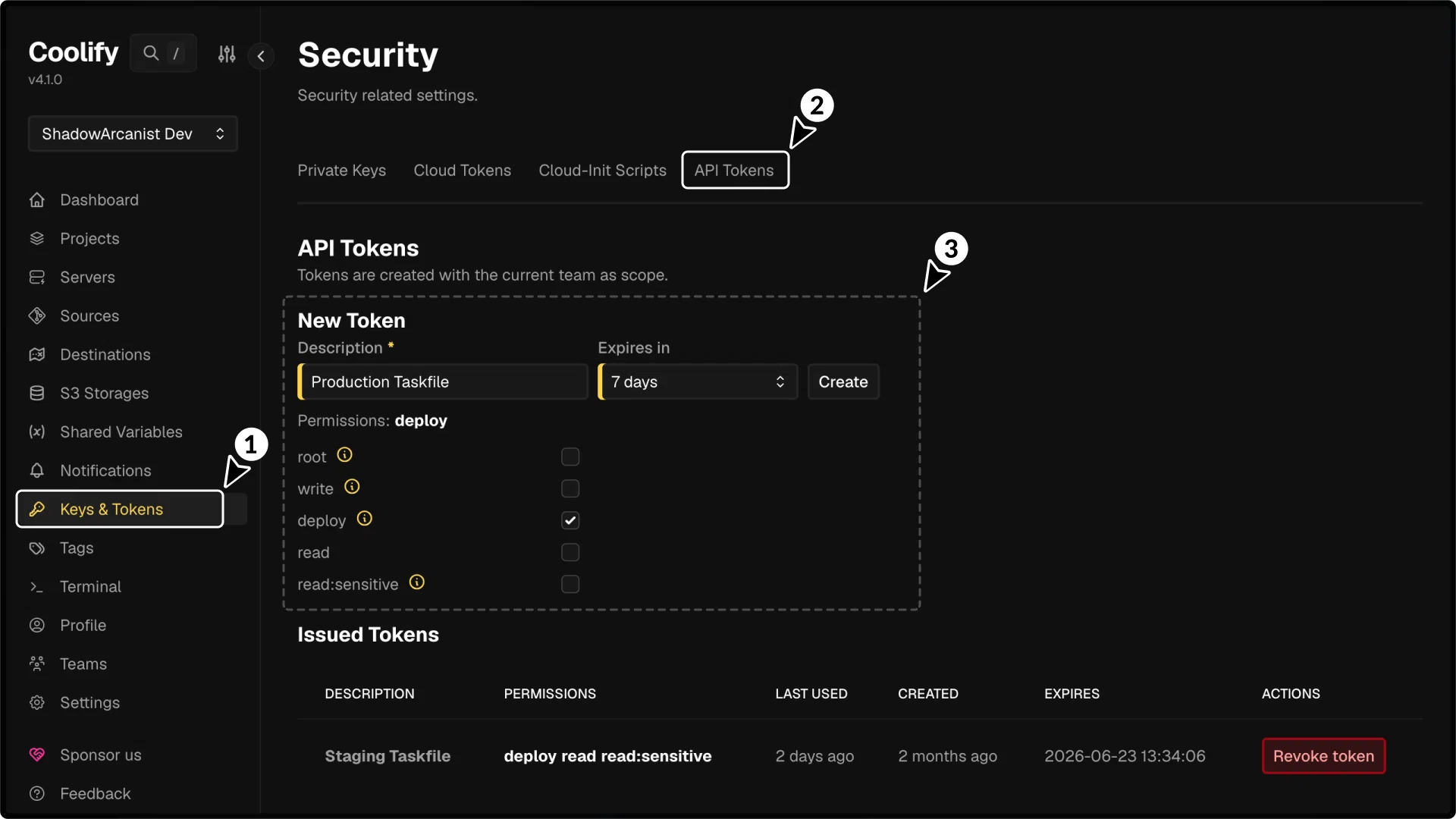
Open Keys & Tokens in the main sidebar, then select API Tokens.
Describe the token
Enter a Description that identifies the caller and purpose, such as production-status-monitor or docs-deploy-workflow.
The description must contain between 3 and 255 characters.
Choose an expiration
Use Expires in to select 7 days, 30 days, 60 days, 90 days, 1 year, or Never.
Prefer an expiration date for automation that can be rotated. Use Never only when the integration cannot be rotated safely on a schedule.
Select permissions
Open Permissions and select only the permissions required by the integration. Review Token permissions before using write, read:sensitive, or root.
Create and copy the token
Select Create token, then copy the generated token immediately. Coolify shows the complete token value only once.
Store it in the caller's secret manager before leaving the page. If the value is lost, revoke the issued token and create another one.
Token permissions
| Permission | Use it for | Important behavior |
|---|---|---|
read | List and inspect resources. | Sensitive response values remain redacted. |
read:sensitive | Read secrets, logs, passwords, private keys, environment values, and Compose content returned by supported endpoints. | Coolify also adds read when this permission is selected. |
write | Create, update, and delete resources through write endpoints. | The token owner must remain an administrator or owner of the token's team when the request runs. |
deploy | Trigger deployments, restarts, stops, cancellations, and deploy webhooks (/api/v1/deploy). | Selecting deploy creates a deploy-only token in the dashboard. |
root | Bypass the read, write, and deploy permission checks on API endpoints. | Instance-wide API access and IP allowlist controls still apply. Only team administrators and owners can create this token. Selecting it removes the other permissions because they are unnecessary. |
Use read for inventory and monitoring, deploy for a deployment-only workflow, and write only when the caller must change configuration. Add read:sensitive only when redacted values are insufficient.
A root token still belongs to one team and its owner must remain a member of that team. It does not provide cross-team access.
Make a test request
Send the complete token as a Bearer credential:
export COOLIFY_URL="https://coolify.shadowarcanist.com"
export COOLIFY_TOKEN="<api-token>"

curl --fail-with-body \
  --header "Authorization: Bearer $COOLIFY_TOKEN" \
  "$COOLIFY_URL/api/v1/teams/current"
A successful request returns the team bound to the token. Do not paste a real token directly into shell history; load it from the caller's secret store in production.
Read Making Requests for request examples and API Permissions for token scope and role restrictions. Rate Limits documents response headers and retry behavior, while API Errors covers status codes. For deployment-only automation, follow Deploy Webhooks.
Team and role scope
Coolify records the active team when the token is created. Switching teams later does not change an issued token.
- Create a separate token for each team an integration must access.
- Removing the token owner from the team makes the token invalid.
- A
writeorrootrequest fails if the token owner no longer has the administrator or owner role. - Changing a user's password revokes that user's API tokens.
- Removing a member, downgrading a member's role through Coolify, or deleting a team revokes affected team tokens.
The Issued Tokens list belongs to the signed-in user. A user can revoke their own token but cannot copy its secret value again.
Rotate or revoke a token
Rotate a token before it expires or whenever its storage or caller changes:
- Create a replacement with the same team and only the permissions still required.
- Copy the replacement into the integration's secret store.
- Make a test request with the replacement.
- Return to Keys & Tokens > API Tokens and select Revoke token for the previous token.
- Confirm that the integration continues working and the previous token now returns
401 Unauthenticated.
An expired token is rejected automatically. Coolify checks hourly for tokens expiring within 24 hours and sends the team's enabled API token expiring notifications.